Setting up k3s Distributed Storage System with Longhorn
Introduction
Longhorn is a lightweight, Kubernetes-native distributed block storage system. It provides persistent storage for workloads that need data to survive pod restarts, rescheduling, or node failures.
Longhorn works by attaching a volume controller (engine) to a pod and storing replicated data across multiple nodes. If a node goes down, another replica can take over, keeping the volume available.
Prerequisites
- Working k3s environment. At least 3 nodes are recommended for full replication and high availability. Check out this guide for more information: High-Availability k3s Cluster Guide with k3sup and kube-vip
- A dedicated partition or extra unallocated space on your nodes is recommended, though not strictly required.
-
Longhorn relies on host-level binaries to manage block devices and network file sharing. Run the following commands on every node in your cluster:
A. open-iscsi (Block Storage Support)
Longhorn uses iSCSI to expose block devices to your pods.
# Ubuntu / Debian
sudo apt update && sudo apt install -y open-iscsi

# RHEL / CentOS
sudo yum install iscsi-initiator-utils -y
After installation, ensure the service is running:
sudo systemctl enable --now iscsidB. nfs-common (ReadWriteMany Support), dm-crypt for encryption
To support
ReadWriteMany(RWX) volumes (where multiple pods access the same volume), Longhorn needs an NFS client.# Ubuntu / Debian sudo apt update && sudo apt install -y nfs-common cryptsetup # RHEL / CentOS sudo yum install nfs-utils -y # Load modules sudo modprobe nfs sudo modprobe nfsd sudo modprobe dm_cryptC. Other Utilities
Ensure these common tools are present (most are pre-installed on standard distros):
-
bash,curl,findmnt,grep,awk,blkid,lsblk,jq
-
- Download the latest Helm release:
curl https://raw.githubusercontent.com/helm/helm/main/scripts/get-helm-3 | bash #Verify helm version - Fix KubeDNS Warning (optional but recommended)
-
Longhorn relies heavily on DNS for volume attachments. Having only one CoreDNS pod (the k3s default) creates a single point of failure.
To increase the replica count to 2:
kubectl scale deployment coredns -n kube-system --replicas=2
-
-
Longhorn provides a handy script to check if your cluster is truly ready. Run this on your non k3s/remote terminal, and then check for errors:
Bash# For AMD64 platform curl -sSfL -o longhornctl https://github.com/longhorn/cli/releases/download/v1.10.1/longhornctl-linux-amd64 # Anticipated error, create longhorn namespace kubectl create namespace longhorn-system # Execute chmod +x longhornctl ./longhornctl check preflight
Installation
-
Add the Longhorn Helm repository:
helm repo add longhorn https://charts.longhorn.io -
Fetch the latest charts from the repository:
helm repo update -
Install Longhorn in the
longhorn-systemnamespace.helm install longhorn longhorn/longhorn --namespace longhorn-system --create-namespace --version 1.10.1 -
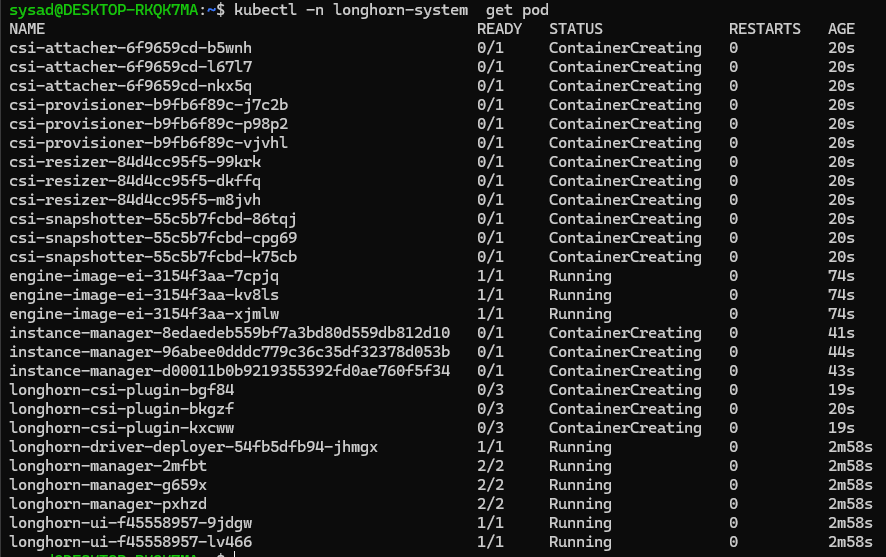
To confirm that the deployment succeeded, run:
kubectl -n longhorn-system get podThe result should look like the following:
Configuration
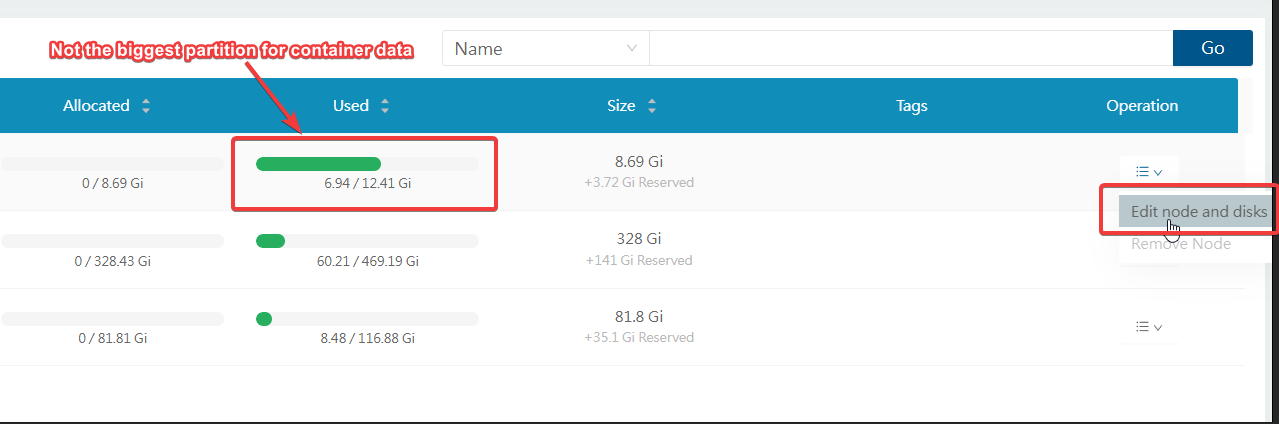
mkdir /home/longhorn-data